I built a Galton board simulator
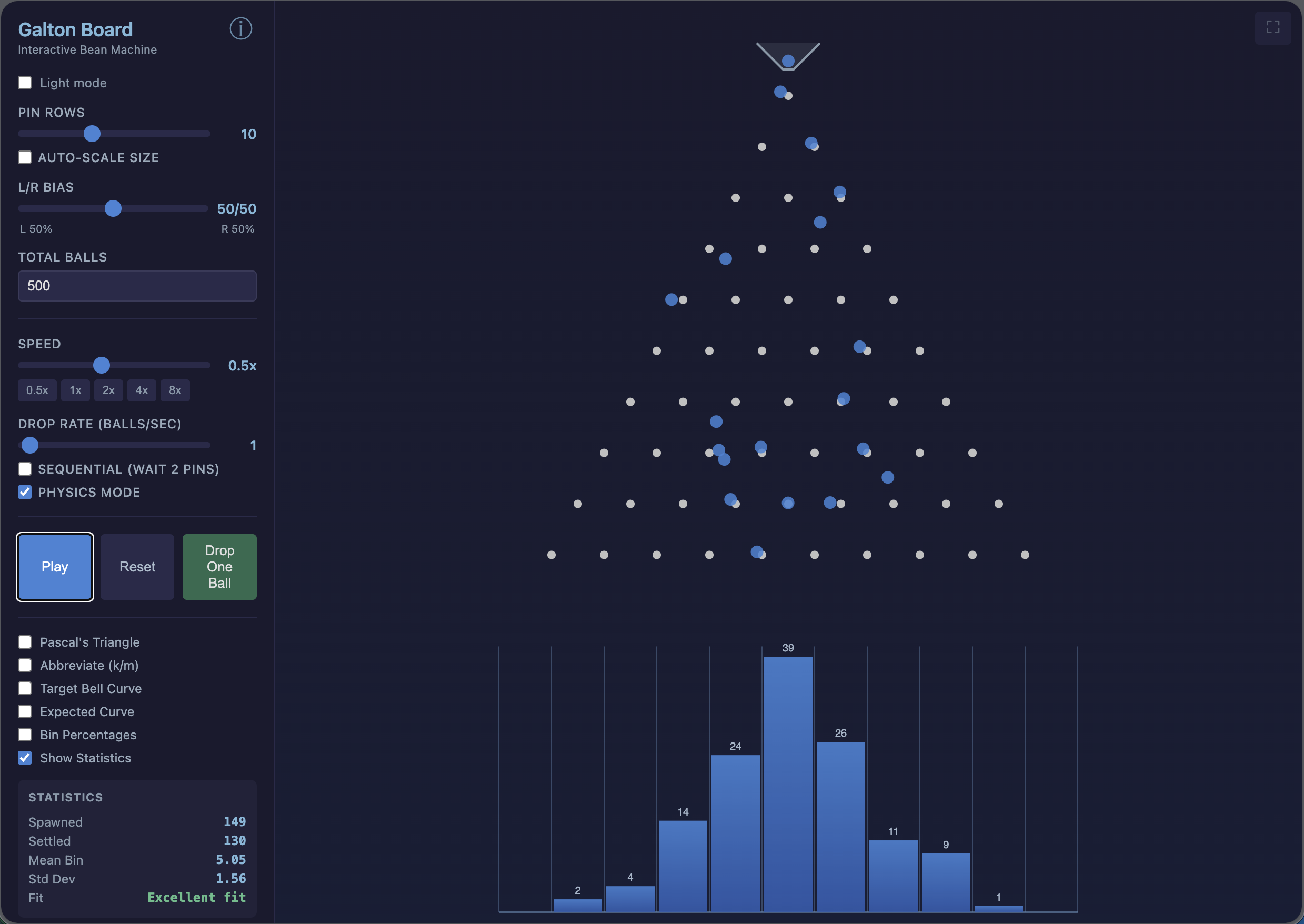
I recently built an interactive Galton board simulator. If you haven’t seen one before: imagine a vertical board with rows of pegs. You drop a ball at the top, it bounces left or right at each peg, and lands in a bin at the bottom. Drop enough balls and they pile up into a bell curve.
Each ball does its own random thing, but the aggregate is weirdly predictable. That’s basically the Central Limit Theorem happening right in front of you.
How it started
I was preparing for a teaching demonstration for a professorship and needed a live demo that would make the Central Limit Theorem click without slides full of formulas. Something I could just pull up and let the audience watch.
There are Galton board simulators online already, and some are quite good. But I couldn’t find one that did everything I wanted. One had nice visuals but no statistics. Another let you adjust the bias but didn’t show Pascal’s Triangle. I kept switching between three different tools during prep and eventually thought: I’ll just combine them into one.
I’ve always felt statistical concepts land better when you can see them. You can prove the CLT on paper, sure. But watching 500 balls tumble through pegs and stack into a normal distribution does something a proof on a blackboard can’t.
What you can do with it
It’s live at galton.markheckmann.de. You can adjust the number of peg rows (1 to 25), bias the left/right probability, control the speed, and set the drop rate anywhere from one ball at a time to 10,000 per second. There are two visual modes: a clean path mode and a physics mode with gravity and ballistic arcs. You can highlight individual balls with color trails, overlay Pascal’s Triangle, and watch live statistics (mean, standard deviation, goodness of fit) update as balls settle.
Dark mode, fullscreen, shareable URLs with your settings baked in.
Fully vibe coded
I didn’t write a single line of JavaScript myself. The whole thing was vibe coded, built by describing what I wanted to Caude AI and going back and forth until it worked. I’m not a frontend developer. Two years ago I couldn’t have built this. That still kind of blows my mind.
Some things I noticed along the way
Getting the physics mode to feel right took more rounds than expected. Balls needed to arc naturally, bounce off pegs convincingly, settle into bins without jittering. Lots of “almost, but not quite” before it looked good.
It runs on vanilla JavaScript and HTML5 Canvas, no frameworks, no dependencies. I wanted it to load fast and work on the kind of classroom projectors that struggle with anything heavier.
Links
The simulator is at galton.markheckmann.de and the source code is on GitHub. Keyboard shortcuts: Space to play/pause, D to drop a ball, R to reset, F for fullscreen. Enjoy!